In this article we will cover the copier’s basic working principles.
The copier detects signals that are sent to telegram channels,groups, chats & saved messages. This includes all messages/signals that are received to you and sent by you.
Lets examine this with an example:
Lets say Peter is sending us signals via telegram chat.
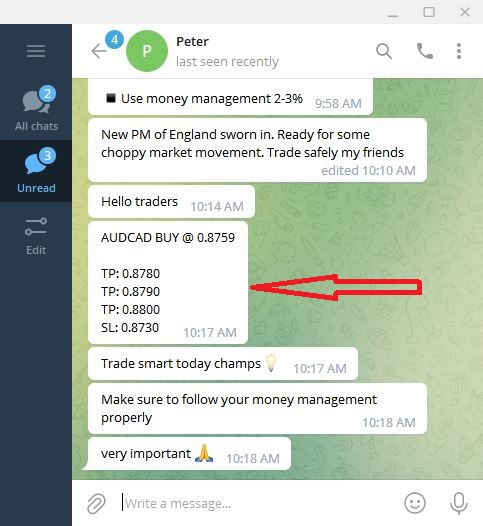
at 10:17am Peter has sent a signal to our chat. Lets see how it detected in our copier app
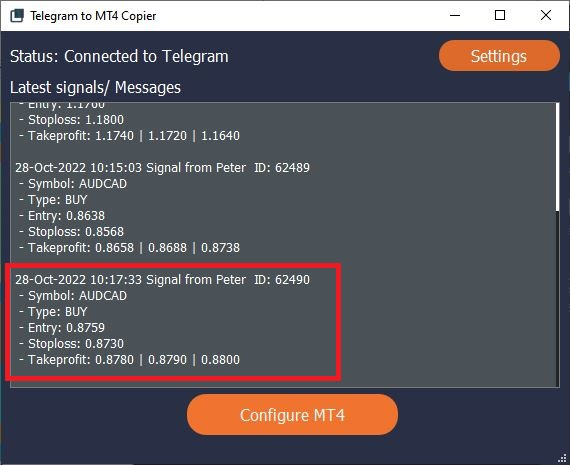
Notice the last entry in the copier(highlighted with the red box). The beginning of the entry says
28-Oct-2022 10:17:33 Signal from Peter ID: 62490
This piece of information tells us that we have received a signal from Peter on 28-Oct-2022 at 10:17:33 and the ID assigned to this signal is 62490. Also the currency pair, operation,entry, stop-loss and take-profit prices are detected properly. Lets see how they have opened the trades in your MT4 platform.
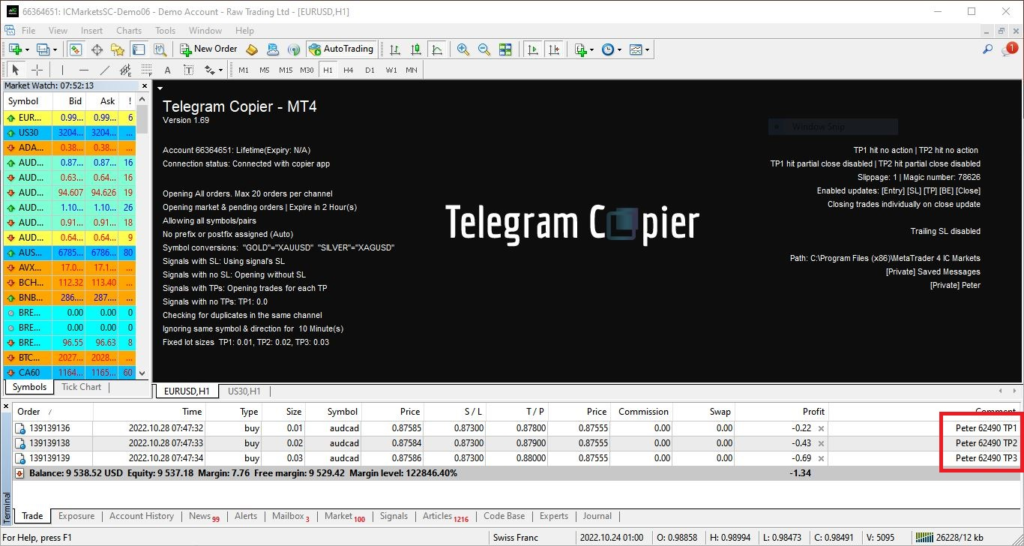
Three trades have opened for the signal correctly. The default setting of the copier is set to open trades for each take-profit level in the signal. Notice the order comments in the bottom right corner(highlighted with the red box).
Peter 62490 TP1
Peter 62490 TP2
Peter 62490 TP3
The comments of contain chat name ,signal ID and the take-profit level. This helps you find how and where the trade’s signal came from.
note: Order open time in in each trade display 28.10.2022 07:47. This is different from the time mentioned in Telegram chat and in the Copier app. This is due to trades are executed at broker’s end therefore the order open and close times are in broker’s timezone.